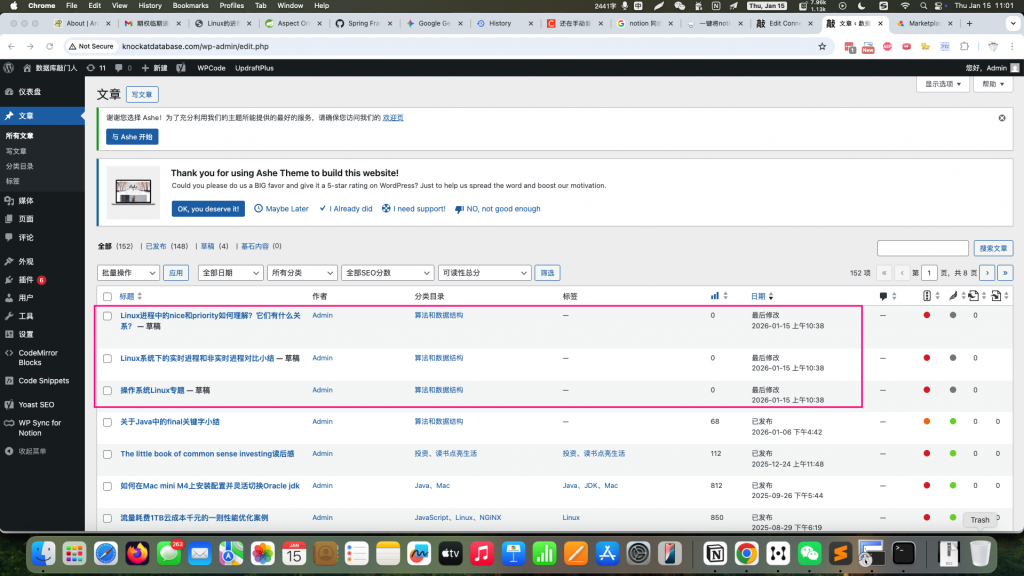
如何解决Notion API: cURL error 35: OpenSSL SSL_connect报错问题
零 问题现象
在前一篇文章中,我通过
一 问题原因分析
Contents
1 校验WordPress和notion网络连接握手
root@iZwz96377ws99tjeva00kcZ:~# curl -v https://api.notion.com/v1/pages
*   Trying 208.103.161.1...
* TCP_NODELAY set
* connect to 208.103.161.1 port 443 failed: Connection refused
*   Trying 208.103.161.2...
* TCP_NODELAY set
* Connected to api.notion.com (208.103.161.2) port 443 (#0)
* ALPN, offering h2
* ALPN, offering http/1.1
* successfully set certificate verify locations:
*   CAfile: /etc/ssl/certs/ca-certificates.crt
  CApath: /etc/ssl/certs
* TLSv1.3 (OUT), TLS handshake, Client hello (1):
* TLSv1.3 (IN), TLS handshake, Server hello (2):
* TLSv1.3 (IN), TLS Unknown, Certificate Status (22):
* TLSv1.3 (IN), TLS handshake, Unknown (8):
* TLSv1.3 (IN), TLS handshake, Certificate (11):
* TLSv1.3 (IN), TLS handshake, CERT verify (15):
* TLSv1.3 (IN), TLS handshake, Finished (20):
* TLSv1.3 (OUT), TLS change cipher, Client hello (1):
* TLSv1.3 (OUT), TLS Unknown, Certificate Status (22):
* TLSv1.3 (OUT), TLS handshake, Finished (20):
* SSL connection using TLSv1.3 / TLS_AES_256_GCM_SHA384
* ALPN, server accepted to use h2
* Server certificate:
*  subject: CN=notion.com
*  start date: Nov 20 01:10:38 2025 GMT
*  expire date: Feb 18 02:10:25 2026 GMT
*  subjectAltName: host "api.notion.com" matched cert's "*.notion.com"
*  issuer: C=US; O=Google Trust Services; CN=WE1
*  SSL certificate verify ok.
* Using HTTP2, server supports multi-use
* Connection state changed (HTTP/2 confirmed)
* Copying HTTP/2 data in stream buffer to connection buffer after upgrade: len=0
* TLSv1.3 (OUT), TLS Unknown, Unknown (23):
* TLSv1.3 (OUT), TLS Unknown, Unknown (23):
* TLSv1.3 (OUT), TLS Unknown, Unknown (23):
* Using Stream ID: 1 (easy handle 0x556dc28fd580)
* TLSv1.3 (OUT), TLS Unknown, Unknown (23):
> GET /v1/pages HTTP/2
> Host: api.notion.com
> User-Agent: curl/7.58.0
> Accept: */*
>
* TLSv1.3 (IN), TLS Unknown, Certificate Status (22):
* TLSv1.3 (IN), TLS handshake, Newsession Ticket (4):
* TLSv1.3 (IN), TLS handshake, Newsession Ticket (4):
* TLSv1.3 (IN), TLS Unknown, Unknown (23):
* Connection state changed (MAX_CONCURRENT_STREAMS updated)!
* TLSv1.3 (OUT), TLS Unknown, Unknown (23):
* TLSv1.3 (IN), TLS Unknown, Unknown (23):
* TLSv1.3 (IN), TLS Unknown, Unknown (23):
< HTTP/2 400
< date: Thu, 15 Jan 2026 02:43:19 GMT
< content-type: application/json; charset=utf-8
< content-length: 145
< server: cloudflare
< cf-ray: 9be206479e673c79-SJC
< cf-cache-status: DYNAMIC
< etag: W/"91-hH0cXVd+yT6JrT+8Az4mfsZzlsY"
< strict-transport-security: max-age=31536000; includeSubDomains; preload
< vary: Accept-Encoding
< content-security-policy: default-src 'none'
< referrer-policy: strict-origin-when-cross-origin
< x-content-type-options: nosniff
< x-dns-prefetch-control: off
< x-download-options: noopen
< x-frame-options: SAMEORIGIN
< x-notion-request-id: f67173cb-6b4b-4216-842e-778493748ae3
< x-permitted-cross-domain-policies: none
< x-xss-protection: 0
< set-cookie: __cf_bm=ngmZSO0G5bir60wsgmyNIYgrZ9Bl5.NG7HWtCCDmkpY-1768444999-1.0.1.1-p2T05RkpbzpjpXGX1lSP0_9nLVD361CinblC3vjN0gt3RVgAjnQ0wwi1mzqeR6aZNQ59asu6OJ5wX9ZikAFPB_8C5E2rU9vImIzWSacSoNI; path=/; expires=Thu, 15-Jan-26 03:13:19 GMT; domain=.notion.com; HttpOnly; Secure; SameSite=None
< set-cookie: _cfuvid=tz6aTxEYKy2QOik8Gp42xz8qDZH4_l_XPl9DrCSD6K8-1768444999360-0.0.1.1-604800000; path=/; domain=.notion.com; HttpOnly; Secure; SameSite=None
< alt-svc: h3=":443"; ma=86400
<
* TLSv1.3 (IN), TLS Unknown, Unknown (23):
* TLSv1.3 (IN), TLS Unknown, Unknown (23):
* Connection #0 to host api.notion.com left intact
{"object":"error","status":400,"code":"invalid_request_url","message":"Invalid request URL.","request_id":"f67173cb-6b4b-4216-842e-778493748ae3"}root@iZwz96377ws99tjeva00kcZ:~#
curl 握手没有问题。
但是结果抛出了400的错误。
有可能是PHP本身与notion进行网络通信时,采用的OpenSSL 版本与协议不匹配,也有可能是证书问题。
2 查看校验PHP使用的openssl协议
root@iZwz96377ws99tjeva00kcZ:~# php -v
PHP 7.2.24-0ubuntu0.18.04.7 (cli) (built: Oct  7 2020 15:24:25) ( NTS )
Copyright (c) 1997-2018 The PHP Group
Zend Engine v3.2.0, Copyright (c) 1998-2018 Zend Technologies
    with Zend OPcache v7.2.24-0ubuntu0.18.04.7, Copyright (c) 1999-2018, by Zend Technologies
root@iZwz96377ws99tjeva00kcZ:~# which php
/usr/bin/php
root@iZwz96377ws99tjeva00kcZ:~# php -i | grep "SSL Version"
SSL Version => OpenSSL/1.1.1
root@iZwz96377ws99tjeva00kcZ:~#
Notion API 强制要求使用 TLS 1.2 或更高版本。而本地使用的是OpenSSL/1.1.1。尝试升级这个协议:
root@iZwz96377ws99tjeva00kcZ:~# sudo apt-get update
Hit:1 http://mirrors.cloud.aliyuncs.com/ubuntu bionic InRelease
Hit:2 http://mirrors.cloud.aliyuncs.com/ubuntu bionic-updates InRelease
Hit:3 http://mirrors.cloud.aliyuncs.com/ubuntu bionic-security InRelease
Ign:4 https://download.docker.com/linux/ubuntu bionic InRelease
Get:5 https://download.docker.com/linux/ubuntu bionic Release [63.6 kB]
Get:6 https://download.docker.com/linux/ubuntu bionic Release.gpg [819 B]
Fetched 64.4 kB in 1s (50.2 kB/s)
Reading package lists... Done
root@iZwz96377ws99tjeva00kcZ:~# sudo apt-get install --only-upgrade ca-certificates
Reading package lists... Done
Building dependency tree
Reading state information... Done
ca-certificates is already the newest version (20230311ubuntu0.18.04.1).
The following packages were automatically installed and are no longer required:
  bridge-utils dns-root-data dnsmasq-base ubuntu-fan
Use 'sudo apt autoremove' to remove them.
0 upgraded, 0 newly installed, 0 to remove and 279 not upgraded.
root@iZwz96377ws99tjeva00kcZ:~#
提示证书已经升级到20230311ubuntu0.18.04.1。
可是,依然报错。尝试看看是不是另外一种情况,PHP在和notion通信时,采用的ca证书不对?
经过拷问Gemini,提示词如下:
我的报错出现在通过WordPress同步notion时出现的:  Last Sync Status
 Error
Notion API: cURL error 35: OpenSSL SSL_connect: SSL_ERROR_SYSCALL in connection to api.notion.com:443  如何解决
给出的解决方案参考:
既然这个问题出现在 WordPress 插件同步过程中,说明你无法直接修改插件底层的 cURL 代码。由于你的服务器是阿里云(中国境内节点),且系统是较旧的 Ubuntu 18.04,
SSL_ERROR_SYSCALL通常是因为服务器与 Notion (Cloudflare) 之间的国际链路不稳定,导致连接被防火墙或运营商强制切断。
以下是针对 WordPress 环境的四种解决方案,按推荐程度排序:
以下是针对 WordPress 环境的四种解决方案,按推荐程度排序:
方案一:使用“简单代理”绕过拦截(最有效)
如果你不想折腾复杂的代理软件,可以尝试通过 PHP 代码让 WordPress 的所有 API 请求走一个特定的代理。
编辑你的 WordPress 根目录下的
wp-config.php文件。
在
/* That's all, stop editing! Happy publishing. */这一行上方添加:PHP
方案二:通过 Hook 强制降低 HTTP 版本(无需代码基础)
Notion 默认使用 HTTP/2。旧版 Ubuntu 的 cURL (7.58.0) 在处理 HTTP/2 时与 Cloudflare 经常断连。我们可以强制 WP 使用 HTTP 1.1。
安装 Code Snippets 插件,或者编辑主题的
functions.php文件。
添加以下代码:PHP
保存后再次尝试同步。
方案三:修复系统级 CA 证书(针对 SSL 错误 35)
虽然你更新过
ca-certificates,但 PHP 有时会引用旧的证书路径。
确认证书路径:
ls /etc/ssl/certs/ca-certificates.crt。
修改
php.ini(你的路径通常在/etc/php/7.2/fpm/php.ini或/etc/php/7.2/cli/php.ini)。
查找
curl.cainfo,去掉前面的分号并修改为:Ini, TOML
重启 PHP-FPM:
sudo service php7.2-fpm restart。
方案四:Hosts 强制解析(解决 DNS 造成的握手延迟)
有时 DNS 解析不稳定也会导致握手超时。你可以尝试将 Notion 的 IP 锁定。
在你的服务器终端运行:
nslookup api.notion.com找到一个响应最快的 IP。
编辑 hosts 文件:
sudo vi /etc/hosts。
添加一行(IP 换成你查到的):Plaintext
为什么会出现这个问题?(逻辑图解)
你的服务器发起 TLS 1.3 握手请求。
中间链路(因为是跨国流量)检测到特征或产生丢包。
连接被重置,cURL 抛出
SSL_ERROR_SYSCALL(系统调用错误)。
建议操作顺序: 先尝试 方案二(因为这最简单且不需要安装额外软件),如果依然报错,说明你的服务器网络环境确实无法直连 Notion,则必须考虑使用 方案一(代理)或者更换一台非中国大陆境内的服务器。
你目前使用的是哪款同步插件?(例如 WP Sync for Notion 或 WP Integration for Notion)我可以根据插件名看看有没有特定的调试开关。
二 问题解决过程
尝试方案三来修复:
1 修改PHP配置文件/etc/php/7.2/fpm/php.ini
root@iZwz96377ws99tjeva00kcZ:~# ls -lrt /etc/ssl/certs/ca-certificates.crt
-rw-r--r-- 1 root root 208567 Jun  5  2024 /etc/ssl/certs/ca-certificates.crt
root@iZwz96377ws99tjeva00kcZ:~# vi /etc/php/7.2/fpm/php.ini
...
[curl]
; A default value for the CURLOPT_CAINFO option. This is required to be an
; absolute path.
;curl.cainfo =
;2026.01.15 解决notion同步到WordPress报错问题
curl.cainfo ='/etc/ssl/certs/ca-certificates.crt'

[openssl]
; The location of a Certificate Authority (CA) file on the local filesystem
; to use when verifying the identity of SSL/TLS peers. Most users should
; not specify a value for this directive as PHP will attempt to use the
; OS-managed cert stores in its absence. If specified, this value may still
; be overridden on a per-stream basis via the "cafile" SSL stream context
; option.
;openssl.cafile=
;2026.01.15 解决notion同步到WordPress报错问题
openssl.cafile='/etc/ssl/certs/ca-certificates.crt'

; If openssl.cafile is not specified or if the CA file is not found, the
....
2重启php7.2-fpm服务
root@iZwz96377ws99tjeva00kcZ:~# service php7.2-fpm status
● php7.2-fpm.service - The PHP 7.2 FastCGI Process Manager
   Loaded: loaded (/lib/systemd/system/php7.2-fpm.service; enabled; vendor preset: enabled)
   Active: active (running) since Sun 2023-12-31 09:20:49 CST; 2 years 0 months ago
     Docs: man:php-fpm7.2(8)
 Main PID: 567 (php-fpm7.2)
   Status: "Processes active: 0, idle: 3, Requests: 15096715, slow: 0, Traffic: 0req/sec"
    Tasks: 4 (limit: 2241)
   CGroup: /system.slice/php7.2-fpm.service
           ├─  567 php-fpm: master process (/etc/php/7.2/fpm/php-fpm.conf)
           ├─ 4041 php-fpm: pool www
           ├─21507 php-fpm: pool www
           └─22166 php-fpm: pool www

Dec 31 09:20:48 iZwz96377ws99tjeva00kcZ systemd[1]: Starting The PHP 7.2 FastCGI Process Manager...
Dec 31 09:20:49 iZwz96377ws99tjeva00kcZ systemd[1]: Started The PHP 7.2 FastCGI Process Manager.
root@iZwz96377ws99tjeva00kcZ:~# php -v
PHP 7.2.24-0ubuntu0.18.04.7 (cli) (built: Oct  7 2020 15:24:25) ( NTS )
Copyright (c) 1997-2018 The PHP Group
Zend Engine v3.2.0, Copyright (c) 1998-2018 Zend Technologies
    with Zend OPcache v7.2.24-0ubuntu0.18.04.7, Copyright (c) 1999-2018, by Zend Technologies
root@iZwz96377ws99tjeva00kcZ:~#
root@iZwz96377ws99tjeva00kcZ:~# service php7.2-fpm restart
root@iZwz96377ws99tjeva00kcZ:~# service php7.2-fpm status
● php7.2-fpm.service - The PHP 7.2 FastCGI Process Manager
   Loaded: loaded (/lib/systemd/system/php7.2-fpm.service; enabled; vendor preset: enabled)
   Active: active (running) since Thu 2026-01-15 10:37:36 CST; 4s ago
     Docs: man:php-fpm7.2(8)
 Main PID: 29228 (php-fpm7.2)
   Status: "Ready to handle connections"
    Tasks: 3 (limit: 2241)
   CGroup: /system.slice/php7.2-fpm.service
           ├─29228 php-fpm: master process (/etc/php/7.2/fpm/php-fpm.conf)
           ├─29247 php-fpm: pool www
           └─29249 php-fpm: pool www

Jan 15 10:37:36 iZwz96377ws99tjeva00kcZ systemd[1]: Stopped The PHP 7.2 FastCGI Process Manager.
Jan 15 10:37:36 iZwz96377ws99tjeva00kcZ systemd[1]: Starting The PHP 7.2 FastCGI Process Manager...
Jan 15 10:37:36 iZwz96377ws99tjeva00kcZ systemd[1]: Started The PHP 7.2 FastCGI Process Manager.
root@iZwz96377ws99tjeva00kcZ:~#
三 问题解决结果
1 WordPress后台重新同步
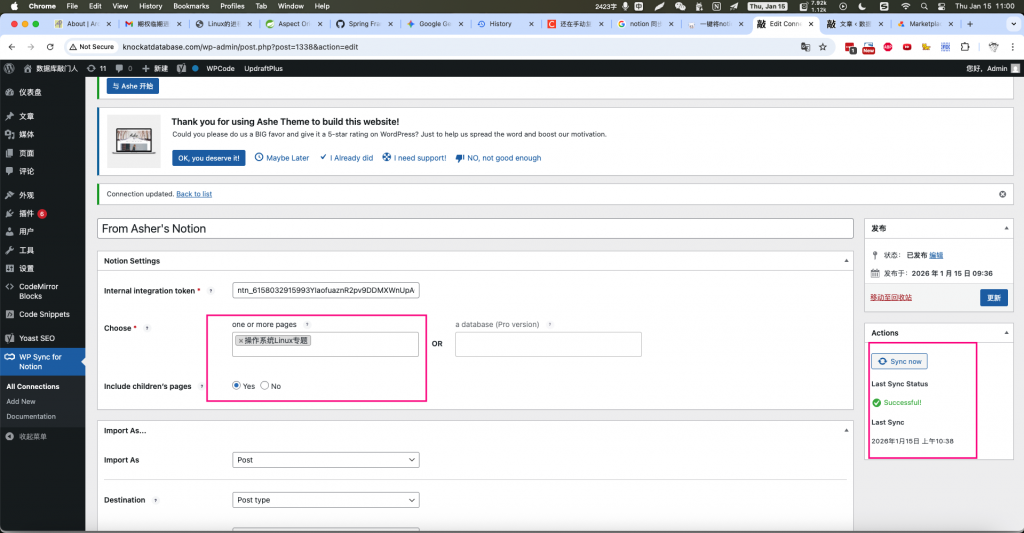
2 WordPress后台确认同步结果