服务器重启之后NGINX自动启动失败的可能原因
Contents
零 问题和故障现象
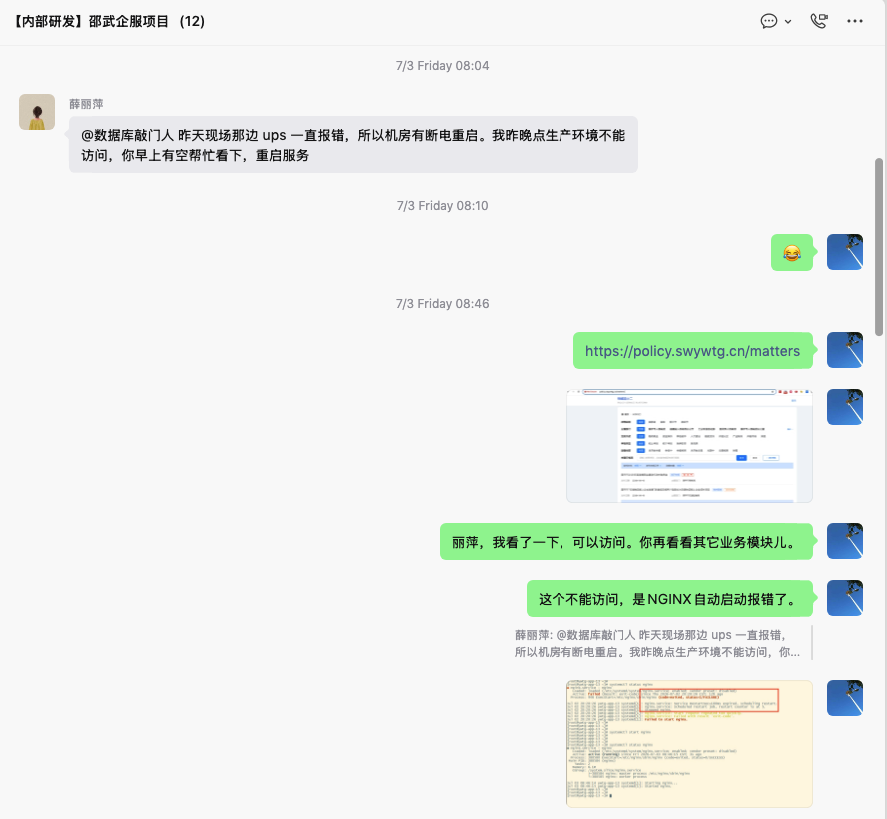
一早上,PM在微信群里反馈说,应用系统访问报错,让我到公司后,抽空赶紧排查下,解决掉问题。提供了一个消息说:昨晚客户机房ups报错,机房断电,服务器肯定有重启过。收到消息之后,第一反应应该是服务器重启之后,有些服务没有正确启动起来。快速回忆了一下该项目,NGINX有设置自动启动服务,后端服务运行在docker容器里,也设置自动重启,底层的数据库也是设置了自动启动服务的。
到达公司之后,访问应用系统时:https://policy.swywtg.cn/matters 确实报错了。通过VPN访问到应用系统服务器,先排查看看NGINX有没有什么报错日志,果然看到NGINX压根儿都没启动起来。于是,通过手工启动NGINX服务:
You have logged onto a secured server..All accesses logged
Authorized users only. All activity may be monitored and reported
Last login: Mon Jun 29 17:26:12 2026 from 172.16.1.29
[root@ywtg-app-13 ~]# docker ps
CONTAINER ID   IMAGE                                                                               COMMAND                  CREATED        STATUS        PORTS                                         NAMES
5d2b3186c6e0   swr.cn-south-1.myhuaweicloud.com/xmsme/shaowu/portal:2026-6-5.1                     "docker-entrypoint.s…"   3 weeks ago    Up 12 hours   0.0.0.0:82->3500/tcp, [::]:82->3500/tcp       portal
eb8b1495e7a9   swr.cn-south-1.myhuaweicloud.com/xmsme/fundamental_service/docker_registry:latest   "/entrypoint.sh /etc…"   4 months ago   Up 12 hours   0.0.0.0:5000->5000/tcp, [::]:5000->5000/tcp   registry
[root@ywtg-app-13 ~]# uptime
 08:45:26 up 12:25,  1 user,  load average: 0.07, 0.02, 0.00
[root@ywtg-app-13 ~]# systemctl status nginx
● nginx.service - nginx
   Loaded: loaded (/etc/systemd/system/nginx.service; enabled; vendor preset: disabled)
   Active: failed (Result: exit-code) since Thu 2026-07-02 20:20:26 CST; 12h ago
  Process: 946 ExecStart=/etc/nginx/sbin/nginx (code=exited, status=1/FAILURE)

Jul 02 20:20:26 ywtg-app-13 systemd[1]: nginx.service: Service RestartSec=100ms expired, scheduling restart.
Jul 02 20:20:26 ywtg-app-13 systemd[1]: nginx.service: Scheduled restart job, restart counter is at 5.
Jul 02 20:20:26 ywtg-app-13 systemd[1]: Stopped nginx.
Jul 02 20:20:26 ywtg-app-13 systemd[1]: nginx.service: Start request repeated too quickly.
Jul 02 20:20:26 ywtg-app-13 systemd[1]: nginx.service: Failed with result 'exit-code'.
Jul 02 20:20:26 ywtg-app-13 systemd[1]: Failed to start nginx.
[root@ywtg-app-13 ~]#
[root@ywtg-app-13 ~]# systemctl start nginx
[root@ywtg-app-13 ~]#
[root@ywtg-app-13 ~]# systemctl status nginx
● nginx.service - nginx
   Loaded: loaded (/etc/systemd/system/nginx.service; enabled; vendor preset: disabled)
   Active: active (running) since Fri 2026-07-03 08:46:15 CST; 3s ago
  Process: 380580 ExecStart=/etc/nginx/sbin/nginx (code=exited, status=0/SUCCESS)
 Main PID: 380584 (nginx)
    Tasks: 2
   Memory: 6.1M
   CGroup: /system.slice/nginx.service
           ├─380584 nginx: master process /etc/nginx/sbin/nginx
           └─380585 nginx: worker process

Jul 03 08:46:14 ywtg-app-13 systemd[1]: Starting nginx...
Jul 03 08:46:15 ywtg-app-13 systemd[1]: Started nginx.
[root@ywtg-app-13 ~]#
然后,再访问应用系统之后,看到正常了,跟PM在群里反馈了。
到这里,问题解决了吗?
解决了,但是没有解决完,没有解决彻底。
为什么设置了NGINX的自动重启,可是服务器操作系统重启之后,NGINX没有启动起来。而手工启动NGINX却可以正常启动呢?并且,从上述NGINX的日志看到:
[root@ywtg-app-13 ~]# systemctl status nginx
● nginx.service - nginx
   Loaded: loaded (/etc/systemd/system/nginx.service; enabled; vendor preset: disabled)
   Active: failed (Result: exit-code) since Thu 2026-07-02 20:20:26 CST; 12h ago
  Process: 946 ExecStart=/etc/nginx/sbin/nginx (code=exited, status=1/FAILURE)

Jul 02 20:20:26 ywtg-app-13 systemd[1]: nginx.service: Service RestartSec=100ms expired, scheduling restart.
Jul 02 20:20:26 ywtg-app-13 systemd[1]: nginx.service: Scheduled restart job, restart counter is at 5.
Jul 02 20:20:26 ywtg-app-13 systemd[1]: Stopped nginx.
Jul 02 20:20:26 ywtg-app-13 systemd[1]: nginx.service: Start request repeated too quickly.
Jul 02 20:20:26 ywtg-app-13 systemd[1]: nginx.service: Failed with result 'exit-code'.
Jul 02 20:20:26 ywtg-app-13 systemd[1]: Failed to start nginx.
[root@ywtg-app-13 ~]#
since Thu 2026-07-02 20:20:26 ,12h以前,NGINX启动失败了,但是在此之前,曾经尝试过5次去启动该服务,每次间隔100ms,但是最后都失败了。重启请求太频繁,最终触发了系统的systemd的保护机制,不再继续尝试启动了,最终是failed的状态。直到,我登录服务器之后,尝试手工启动NGINX,并最终成功。
一 分析并解决问题
0 查看NGINX启动错误日志
[root@ywtg-app-13 ~]# tail -n 50 /etc/nginx/logs/error.log
...
2026/06/25 10:59:49 [notice] 254669#0: signal process started
2026/06/26 08:58:36 [notice] 924447#0: signal process started
2026/06/26 15:46:31 [notice] 1131680#0: signal process started
2026/06/29 09:23:51 [notice] 3131300#0: signal process started
2026/07/02 17:59:38 [notice] 1393351#0: signal process started
2026/07/02 20:20:23 [emerg] 860#0: host not found in upstream "linye.swywtg.cn" in /etc/nginx/conf.d/8443https_policy_pc.conf:113
2026/07/02 20:20:25 [emerg] 906#0: host not found in upstream "linye.swywtg.cn" in /etc/nginx/conf.d/8443https_policy_pc.conf:113
2026/07/02 20:20:25 [emerg] 913#0: host not found in upstream "linye.swywtg.cn" in /etc/nginx/conf.d/8443https_policy_pc.conf:113
2026/07/02 20:20:25 [emerg] 931#0: host not found in upstream "linye.swywtg.cn" in /etc/nginx/conf.d/8443https_policy_pc.conf:113
2026/07/02 20:20:25 [emerg] 946#0: host not found in upstream "linye.swywtg.cn" in /etc/nginx/conf.d/8443https_policy_pc.conf:113
[root@ywtg-app-13 ~]#
看到,昨天晚上,NGINX的确随着操作系统的启动而启动,但是尝试5次之后失败了,日志里显示有5条记录,这里有个线索指向了配置文件/etc/nginx/conf.d/8443https_policy_pc.conf的第113行,upstream找不到linye.swywtg.cn。
1 继续查看系统systemd记录的系统日志
[root@ywtg-app-13 ~]# journalctl -u nginx.service --since "2026-07-02 20:15:00" --until "2026-07-02 20:25:00"
-- Logs begin at Thu 2026-01-08 10:44:56 CST, end at Fri 2026-07-03 08:54:54 CST. --
Jul 02 20:20:23 ywtg-app-13 systemd[1]: Starting nginx...
Jul 02 20:20:24 ywtg-app-13 nginx[860]: nginx: [emerg] host not found in upstream "linye.swywtg.cn" in /etc/nginx/conf.d/8443https_policy_pc.conf:113
Jul 02 20:20:24 ywtg-app-13 systemd[1]: nginx.service: Control process exited, code=exited, status=1/FAILURE
Jul 02 20:20:24 ywtg-app-13 systemd[1]: nginx.service: Failed with result 'exit-code'.
Jul 02 20:20:24 ywtg-app-13 systemd[1]: Failed to start nginx.
Jul 02 20:20:24 ywtg-app-13 systemd[1]: nginx.service: Service RestartSec=100ms expired, scheduling restart.
Jul 02 20:20:24 ywtg-app-13 systemd[1]: nginx.service: Scheduled restart job, restart counter is at 1.
Jul 02 20:20:24 ywtg-app-13 systemd[1]: Stopped nginx.
Jul 02 20:20:25 ywtg-app-13 systemd[1]: Starting nginx...
Jul 02 20:20:25 ywtg-app-13 nginx[906]: nginx: [emerg] host not found in upstream "linye.swywtg.cn" in /etc/nginx/conf.d/8443https_policy_pc.conf:113
Jul 02 20:20:25 ywtg-app-13 systemd[1]: nginx.service: Control process exited, code=exited, status=1/FAILURE
Jul 02 20:20:25 ywtg-app-13 systemd[1]: nginx.service: Failed with result 'exit-code'.
Jul 02 20:20:25 ywtg-app-13 systemd[1]: Failed to start nginx.
Jul 02 20:20:25 ywtg-app-13 systemd[1]: nginx.service: Service RestartSec=100ms expired, scheduling restart.
Jul 02 20:20:25 ywtg-app-13 systemd[1]: nginx.service: Scheduled restart job, restart counter is at 2.
Jul 02 20:20:25 ywtg-app-13 systemd[1]: Stopped nginx.
Jul 02 20:20:25 ywtg-app-13 systemd[1]: Starting nginx...
Jul 02 20:20:25 ywtg-app-13 nginx[913]: nginx: [emerg] host not found in upstream "linye.swywtg.cn" in /etc/nginx/conf.d/8443https_policy_pc.conf:113
Jul 02 20:20:25 ywtg-app-13 systemd[1]: nginx.service: Control process exited, code=exited, status=1/FAILURE
Jul 02 20:20:25 ywtg-app-13 systemd[1]: nginx.service: Failed with result 'exit-code'.
Jul 02 20:20:25 ywtg-app-13 systemd[1]: Failed to start nginx.
Jul 02 20:20:25 ywtg-app-13 systemd[1]: nginx.service: Service RestartSec=100ms expired, scheduling restart.
Jul 02 20:20:25 ywtg-app-13 systemd[1]: nginx.service: Scheduled restart job, restart counter is at 3.
Jul 02 20:20:25 ywtg-app-13 systemd[1]: Stopped nginx.
Jul 02 20:20:25 ywtg-app-13 systemd[1]: Starting nginx...
Jul 02 20:20:25 ywtg-app-13 nginx[931]: nginx: [emerg] host not found in upstream "linye.swywtg.cn" in /etc/nginx/conf.d/8443https_policy_pc.conf:113
Jul 02 20:20:25 ywtg-app-13 systemd[1]: nginx.service: Control process exited, code=exited, status=1/FAILURE
Jul 02 20:20:25 ywtg-app-13 systemd[1]: nginx.service: Failed with result 'exit-code'.
Jul 02 20:20:25 ywtg-app-13 systemd[1]: Failed to start nginx.
Jul 02 20:20:25 ywtg-app-13 systemd[1]: nginx.service: Service RestartSec=100ms expired, scheduling restart.
Jul 02 20:20:25 ywtg-app-13 systemd[1]: nginx.service: Scheduled restart job, restart counter is at 4.
Jul 02 20:20:25 ywtg-app-13 systemd[1]: Stopped nginx.
Jul 02 20:20:25 ywtg-app-13 systemd[1]: Starting nginx...
Jul 02 20:20:25 ywtg-app-13 nginx[946]: nginx: [emerg] host not found in upstream "linye.swywtg.cn" in /etc/nginx/conf.d/8443https_policy_pc.conf:113
Jul 02 20:20:25 ywtg-app-13 systemd[1]: nginx.service: Control process exited, code=exited, status=1/FAILURE
Jul 02 20:20:25 ywtg-app-13 systemd[1]: nginx.service: Failed with result 'exit-code'.
Jul 02 20:20:25 ywtg-app-13 systemd[1]: Failed to start nginx.
Jul 02 20:20:26 ywtg-app-13 systemd[1]: nginx.service: Service RestartSec=100ms expired, scheduling restart.
Jul 02 20:20:26 ywtg-app-13 systemd[1]: nginx.service: Scheduled restart job, restart counter is at 5.
Jul 02 20:20:26 ywtg-app-13 systemd[1]: Stopped nginx.
Jul 02 20:20:26 ywtg-app-13 systemd[1]: nginx.service: Start request repeated too quickly.
Jul 02 20:20:26 ywtg-app-13 systemd[1]: nginx.service: Failed with result 'exit-code'.
Jul 02 20:20:26 ywtg-app-13 systemd[1]: Failed to start nginx.
[root@ywtg-app-13 ~]#
通过journalctl -u nginx.service –since "2026-07-02 20:15:00" –until "2026-07-02 20:25:00"命令,查看系统里nginx.service这个服务单元,在–since "2026-07-02 20:15:00" –until "2026-07-02 20:25:00"10分钟的时间范围内的所有报错日志,同样看到提示host not found in upstream "linye.swywtg.cn" in /etc/nginx/conf.d/8443https_policy_pc.conf:113。
这就说明了,昨晚NGINX服务随着操作系统的启动而自动启动时,最终没有启动的原因是host not found in upstream "linye.swywtg.cn" in /etc/nginx/conf.d/8443https_policy_pc.conf:113。
2 根据错误提示,查看 /etc/nginx/conf.d/8443https_policy_pc.conf配置文件
   110  # 2026.05.15  把http://linye.swywtg.cn:9104  代理为 https://policy.swywtg.cn/linye 核心代理配置
   111      location /linye/ {
   112          # 转发请求到后端地址
   113          proxy_pass http://linye.swywtg.cn:9104/;
   114
   115          # 传递原始请求头,保证后端能获取真实信息
   116          proxy_set_header Host $host;
   117          proxy_set_header X-Real-IP $remote_addr;
   118          proxy_set_header X-Forwarded-For $proxy_add_x_forwarded_for;
   119          proxy_set_header X-Forwarded-Proto $scheme;
   120
   121          # 解决可能出现的重定向路径问题
   122          proxy_redirect off;
   123      }
   124
没错,配置文件里的第113行,确实有一个反向地理的目的地址:http://linye.swywtg.cn:9104/
服务器上,尝试ping域名,Telnet对应的端口:
[root@ywtg-app-13 ~]# telnet linye.swywtg.cn 9104
Trying 218.67.107.130...
Connected to linye.swywtg.cn.
Escape character is '^]'.
^]
telnet> quit
Connection closed.
[root@ywtg-app-13 ~]# ping linye.swywtg.cn
PING linye.swywtg.cn (218.67.107.130) 56(84) bytes of data.
^C
--- linye.swywtg.cn ping statistics ---
8 packets transmitted, 0 received, 100% packet loss, time 7186ms

[root@ywtg-app-13 ~]#
互联网上直接访问这个地址 http://linye.swywtg.cn:9104/ ,

或者是 http://218.67.107.130:9104/#/ 域名加端口,都是正常的。

分析到这里,越来越疑惑了,NGINX日志里提示,因为upstream linye.swywtg.cn无法访问或解析而导致启动失败。实际上,该域名无论是从浏览器直接访问,还是Telnet 对应的端口,网络都是通的。
这就矛盾了,逻辑不成立了。
3 查看分析NGINX服务的配置文件/etc/systemd/system/nginx.service
[root@ywtg-app-13 ~]# cat /etc/systemd/system/nginx.service
[Unit]
Description=nginx
After=network.target

[Service]
Type=forking
ExecStart=/etc/nginx/sbin/nginx
ExecReload=/etc/nginx/sbin/nginx -s reload
ExecStop=/etc/nginx/sbin/nginx -s quit
PrivateTmp=true
Restart=always

[Install]
WantedBy=multi-user.target
[root@ywtg-app-13 ~]#
NGINX服务配置项里,在操作系统的网络服务启动之后,After=network.target,就开始尝试启动。有没有可能,在操作系统启动的过程中,此时服务器需要访问的DNS服务器还没有正常启动,导致服务器解析NGINX配置文件里的upstream linye.swywtg.cn失败,而导致无法启动。或者其它的网络组件没有完全启动成功,导致解析这个域名失败,最终造成NGINX启动失败呢?
经过查阅资料:
NGINX自身有一套自己的运行和校验机制,启动或重启过程中,它会对所有配置文件中的涉及到proxy_pass的所有域名都进行强制解析,如果解析失败,NGINX则会认为这是一个致命的错误,[emerg],直接拒绝启动。
4 修改NGINX服务配置文件
修改 /etc/systemd/system/nginx.service 配置文件,添加
After=network.target network-online.target nss-lookup.target Wants=network-online.target
意味着,需要网络启动成功,网络服务启动成功,dns解析可以之后,再尝试启动NGINX。并且,如果启动之后,需要间隔5s再次尝试重启。
[root@ywtg-app-13 ~]# cat /etc/systemd/system/nginx.service
[Unit]
Description=nginx

# 核心:加入 network-online.target 和 nss-lookup.target(域名解析服务)
After=network.target network-online.target nss-lookup.target
Wants=network-online.target

[Service]
Type=forking
ExecStart=/etc/nginx/sbin/nginx
ExecReload=/etc/nginx/sbin/nginx -s reload
ExecStop=/etc/nginx/sbin/nginx -s quit
PrivateTmp=true
Restart=always
# 如果失败,等 5 秒再试,别傻傻地在 1 秒内连试 5 次
RestartSec=5s

[Install]
WantedBy=multi-user.target
[root@ywtg-app-13 ~]# systemctl daemon-reload
[root@ywtg-app-13 ~]# /etc/nginx/sbin/nginx -t
nginx: the configuration file /etc/nginx/conf/nginx.conf syntax is ok
nginx: configuration file /etc/nginx/conf/nginx.conf test is successful
[root@ywtg-app-13 ~]# /etc/nginx/sbin/nginx -s reload
[root@ywtg-app-13 ~]# systemctl restart nginx
[root@ywtg-app-13 ~]# systemctl status nginx
● nginx.service - nginx
   Loaded: loaded (/etc/systemd/system/nginx.service; enabled; vendor preset: disabled)
   Active: active (running) since Fri 2026-07-03 14:53:06 CST; 3s ago
  Process: 567200 ExecStart=/etc/nginx/sbin/nginx (code=exited, status=0/SUCCESS)
 Main PID: 567201 (nginx)
    Tasks: 2
   Memory: 1.9M
   CGroup: /system.slice/nginx.service
           ├─567201 nginx: master process /etc/nginx/sbin/nginx
           └─567202 nginx: worker process

Jul 03 14:53:06 ywtg-app-13 systemd[1]: Starting nginx...
Jul 03 14:53:06 ywtg-app-13 systemd[1]: Started nginx.
[root@ywtg-app-13 ~]#
[root@ywtg-app-13 ~]# ps -ef|grep nginx
root      567201       1  0 14:53 ?        00:00:00 nginx: master process /etc/nginx/sbin/nginx
root      567546  567201  0 14:53 ?        00:00:00 nginx: worker process
root      567632  385040  0 14:54 pts/2    00:00:00 grep nginx
[root@ywtg-app-13 ~]#
这里,执行了systemctl restart nginx,对于生产系统要谨慎使用,通常情况下,应该使用热加载的方式来加载配置。为了验证配置项,这里才使用restart。
二 问题复盘
结合PM早上提供的客户机房ups故障,服务器重启,导致系统故障,以及今天早上我手工启动NGINX正常的时间线:
- 昨天晚上,2026年7月2日,服务器刚加电启动:此时系统的网卡虽然可能亮了,但是 DNS 解析服务(如
systemd-resolved或NetworkManager)还没有完全就绪,或者这台NGINX服务器无法访问到它的 DNS 服务器; - 接下来Nginx 急着跟随操作系统的启动而启动服务:因为
nginx.service里只写了After=network.target(这个参数只代表网卡设备起来了,不代表要求网络真正能通、DNS能解析); - 连续碰壁 5 次:Nginx 强行去解析
linye.swywtg.cn,结果解析失败了(DNS解析故障,或者网络不通),连续报错 5 次; - 触发保护,彻底罢工:systemd 发现 Nginx 在短短几秒内死了 5 次,触发了频率限制,判定服务启动失败,不再尝试继续启动服务;
- 今天早上手动启动NGINX时:服务器开机已经10几个小时了,网络服务和 DNS 早就完全通了。所以,我再去
pinglinye.swywtg.cn时,自然能解析到对应的IP218.67.107.130,telnet linye.swywtg.cn 9104时,也是通的。最后我手动systemctl start nginx就一切正常,系统也可以正常访问了。